Mocky
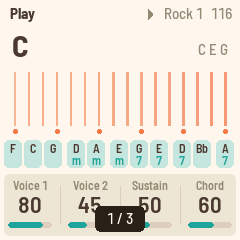
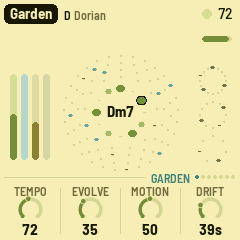
Pictures on the FM-1's screen, sent from your browser. Drop a screen mockup on the page and it's on the FM-1 a moment later, exactly as the screen will show it: check the colours, the sizes, and how the text reads at arm's length, on the real thing.
Version 0.9. It installs and
uninstalls the way Felucca and X0X do, and the installer can put M-VAVE's own firmware back. Installing is at your own risk.
Sending
| Any size | Pictures are scaled to the screen's 240 × 240: Fit (with a colour behind), Fill (cropped), Stretch, or 1:1. A picture made at 240 × 240 arrives pixel for pixel. |
| True colours | The page shows what the screen will show (the screen's 16-bit colour). Dither for photos and gradients, if you like. |
| Keep | Kept pictures stay on the FM-1 when it's switched off: 276 KB of room, up to 64 pictures. A flat mockup takes a few KB, a photo about 116 KB. |
| Several | Drop several pictures at once and they're sent in order: a whole flow, ready to step through. |
| Watch a file | Pick a file and the page sends it again each time it changes. Export from your design tool over the same file and the FM-1 follows. |
On the FM-1
| White keys | Pictures 1–16. Their lights show which are kept; the one on the screen blinks. |
| OCT− · OCT+ | Previous, next. SELECT, ALGORITHM, PRESETS and KNOB 1–3 step too. |
| PLAY | Slideshow on and off. KNOB 4 sets the pace, 1 to 30 seconds a picture. |
| SAVE | Keeps a picture sent without "Keep" (SAVE blinks while there is one). |
| HOME | Which picture this is, and how much room is left. |
Mocky starts on the picture you looked at last.
To go back to the official firmware, use the installer's "Back to the stock firmware", or M-VAVE's updater, M-UPGRADE, from m-vave.com/download. M-VAVE and FM-1 are trademarks of their owners. Mocky is not affiliated with them.